Geometry Jump 3D
F4ntom GamesMusic
3.6179.00 Reviews
- Version
- 1.1.4
- Installs
- 1.00M
- Age Rating
- Everyone
Screenshots
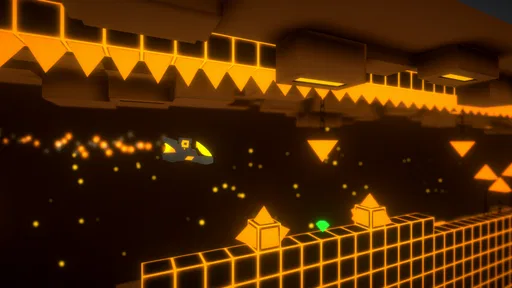
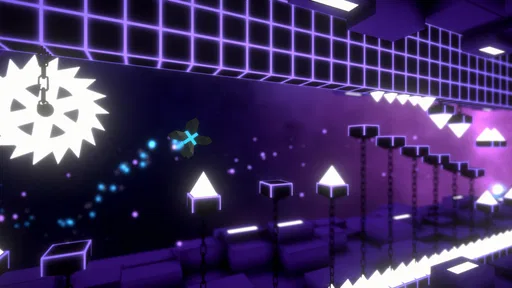
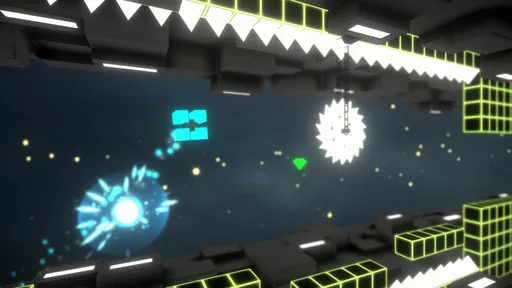
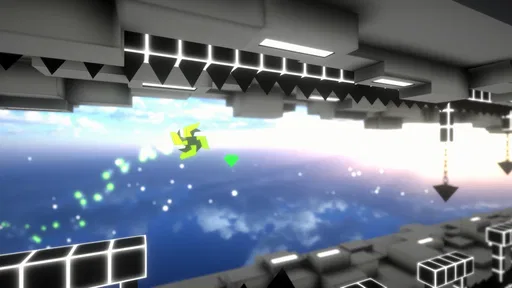
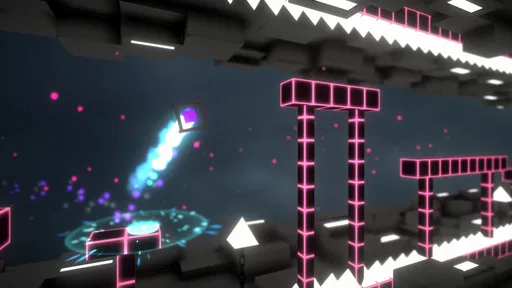
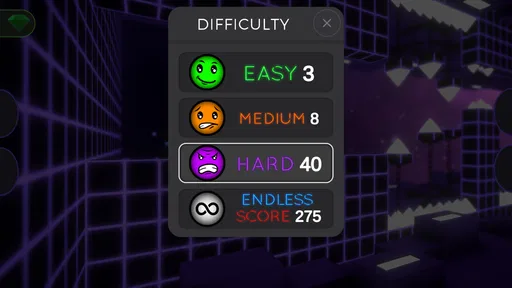
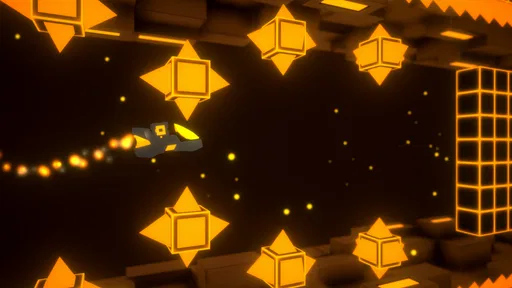
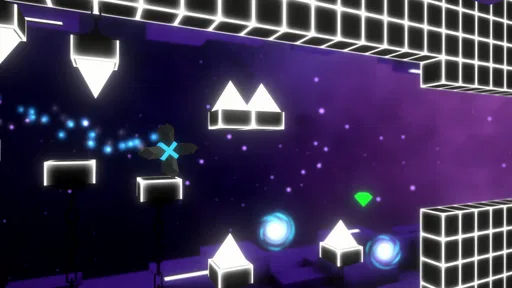
Our Review of Geometry Jump 3D
 Analysis by Appyee
Geometry Jump 3D is the kind of music game I open when I want a quick challenge rather than a long story or a complicated strategy session. The idea is immediate: tap to make a geometric character jump, avoid hazards, and collect diamonds while moving through three-dimensional stages. That simplicity is appealing, but it also means the game gives you very little room for hesitation. A missed tap can end a run quickly, and some of the frustration comes from learning the timing rather than from understanding the controls.
I spent time looking at it as both a casual game and a test of reflexes. My overall impression is mixed but positive: it is easy to start, free to download, and has enough stage variety to keep short sessions interesting. At the same time, the average rating of 3.6 from around 6.8 thousand ratings suggests that the experience will not suit everyone. I can see why some players enjoy its quick rhythm and why others may find the repetition or occasional difficulty tiring.
Getting started without turning the first run into a problem
The game comes from F4ntom Games and is listed in the music category, although I would describe the actual experience as a reflex platform game with a musical presentation. It is free, aimed at Everyone, and has passed the one-million-install mark. That makes it easy to try without committing money first, but the free-to-play format still matters because optional purchases are available at $1.99 per item.
Installation should be straightforward on a compatible device. The minimum operating system is Android 7.1, so older phones may be supported, while newer Android devices should have no trouble meeting that basic requirement. I would still avoid opening the game for the first time when the phone is already struggling with several demanding apps. A rhythm-focused game depends on responsive input, and background activity can make any tap-based title feel less precise.
My first practical recommendation is to begin with the phone held in the position you plan to use for every later session. Changing grip halfway through a stage can make the timing feel inconsistent, especially if your thumb lands in a slightly different place. I also prefer playing with notifications silenced. A message banner or accidental swipe does more damage here than it would in a turn-based game because the action does not politely wait for you.
The controls are deliberately limited, which is helpful for learning but unforgiving when something goes wrong. You are not memorizing a large button layout; you are trying to understand when a tap produces a useful jump. That makes the opening stages important. Instead of rushing to collect every diamond, I recommend using the first attempts to watch the path and identify the distance between obstacles. Collectibles are valuable for making a run feel rewarding, but survival teaches you more during the first few tries.
Where players are most likely to get stuck
The first major sticking point is usually timing. A player may tap when the character appears close to an obstacle, only to discover that the jump needed to avoid it had to begin earlier. Three-dimensional movement can also make distance harder to judge than in a flat side-scrolling game. What looks like a small gap may require a more deliberate jump, while a tempting diamond may pull your attention away from the safer route.
I found it useful to separate the game into two goals: finishing the stage and collecting everything visible. Treating both as mandatory makes early attempts unnecessarily stressful. On a first pass, I focus on recognizing the route. Once I know where the risky sections are, I can decide whether a diamond is worth the extra movement. This small change in approach makes the game feel less random, even when a stage still demands quick reactions.
Another source of confusion is the difference between a genuine control mistake and a late reaction. If the character jumps correctly but still hits an obstacle, the problem is probably the starting moment rather than a broken input. I would test the same section several times with a slightly earlier tap before assuming the game has failed to register the command. That is especially important on compact phone screens, where a player may unconsciously tap the display with a different part of the thumb during tense moments.
Some users may also get stuck because they approach every stage with the same rhythm. That is a mistake I made at first. A comfortable tapping pattern from one level does not automatically transfer to another. The visual layout changes the required spacing, and a steady beat in your head can become a disadvantage if it encourages you to tap mechanically instead of responding to the obstacle ahead.
Simple setup checks before blaming the controls
If the game feels slow or unresponsive, I would start with basic checks rather than immediately reinstalling it. Close apps that are actively using the phone, make sure the device is not overheating, and try a short session after the phone has had a chance to settle. These steps are not specific fixes promised by the developer; they are sensible ways to distinguish a device problem from a gameplay problem.
Screen condition matters more than many players expect. A dirty or damp display can turn a precise tap into a weak or misplaced one. I recommend cleaning the screen and removing anything that changes how your finger contacts it. If taps work normally in other apps but feel unreliable only during a difficult section, the issue may be timing rather than the display itself.
Sound can also affect how the game feels, even if you are capable of playing by sight. I prefer testing with the audio at a comfortable level instead of immediately muting everything. The musical presentation can help create a sense of pace, but it should not replace visual attention. If the sound appears delayed or distracting, lower it and compare the next few attempts. This gives you a practical way to decide whether audio is helping your timing or encouraging you to follow the wrong rhythm.
It is worth checking that the game has finished installing properly and that the phone has enough free space for normal operation. I would not treat a single crash or frozen screen as proof that the entire game is defective. Restarting the app, rebooting the phone, and trying again under lighter conditions are reasonable first steps. If the same issue continues while other games run normally, then contacting the developer, F4ntom Games, is more useful than repeatedly changing your playing technique.
The current version is 1.1.4, so I would also confirm that the installed version matches the latest version available for the device. Updating can resolve compatibility problems, but I would avoid assuming that every performance issue will disappear after an update. A phone that meets the minimum Android requirement can still offer a less comfortable experience than a newer device, particularly if its screen response or general performance is limited.
Recovering a run and building a better routine
Geometry Jump 3D rewards a repeatable practice routine more than frantic experimentation. When I fail at the same obstacle, I stop trying to complete the entire stage and concentrate on the approach to that one point. I watch the character’s position, choose an earlier reference point for the tap, and repeat the movement until the timing feels familiar. This is more efficient than changing several things at once.
A useful workflow is to make the first attempt an observation run. I accept that I may not collect many diamonds and pay attention to the order of hazards. On the next attempt, I aim to pass the first difficult section without adding unnecessary movement. Only after that feels stable do I try for optional collectibles. This approach is particularly helpful in a game with more than one hundred three-dimensional levels, because progress can otherwise become a cycle of repeating the same opening section without learning anything from it.
Short sessions work better for me than extended grinding. Reflex games become less reliable when my attention drops, and a tired player may interpret ordinary mistakes as inconsistent controls. If I fail repeatedly, I take a break and return later rather than forcing another dozen attempts. That is not just a comfort tip: it protects the learning process, because frustration tends to make taps later and more aggressive.
When a run ends unexpectedly, I mentally classify the failure. Was the tap late, was the route misread, or did the phone appear not to respond? Each answer calls for a different response. A late tap needs an earlier cue. A misread route needs slower observation. A suspected input issue needs a basic device check. This simple separation prevents me from “fixing” the wrong problem.
I also recommend keeping diamond collection secondary until you understand the stage. The temptation to move toward a collectible can cause a player to abandon a safe line. In my experience, the best use of diamonds is as a reason to replay a level after learning it, not as an obligation during the first attempt. That turns them into a long-term motivation instead of a source of avoidable failures.
When the app may not be the real cause
Not every poor session points to a defect in the game. A crowded screen, a tired hand, unstable device performance, or an uncomfortable grip can all make a one-tap game feel unfair. Because the control scheme is so small, the player notices every small inconsistency. In a more complex game, a missed action might be hidden among several inputs; here, the entire result can depend on one moment.
I would compare the response with another simple touch game before drawing conclusions. If taps are delayed everywhere, the phone or screen is the more likely cause. If other apps respond normally but this game feels difficult only in particular sections, I would first review the timing and visual distance. This comparison is more reliable than judging the game after one frustrating level.
Device orientation and grip can create their own problems. Holding the phone too tightly may make the thumb less flexible, while resting a finger near the edge can lead to accidental touches. I get better results when the phone is supported comfortably and the tapping finger has a clear, repeatable path. That sounds minor, but a game built around jumping at exactly the right moment magnifies small physical habits.
There is also a difference between a game being difficult and a game being unsuitable for a particular player. Someone who wants relaxed music listening with occasional interaction may prefer a rhythm app that emphasizes songs rather than obstacle avoidance. Someone looking for deep progression, narrative, or multiplayer competition should probably choose another category altogether. Geometry Jump 3D is strongest when the player enjoys repeating a short challenge until the movement becomes automatic.
The age rating of Everyone makes it approachable for a broad audience, but that does not mean every player will find it equally comfortable. Younger users may need help understanding that collecting every diamond is optional during practice. Older casual players may appreciate the simple controls but dislike the precision required by later attempts. The right fit depends less on age than on patience with repetition and quick reactions.
How it compares with familiar music and reflex games
Compared with a traditional music player or rhythm app, this game asks for much more active attention. You are not simply following a song or tapping a visible beat; you are steering a jump through a three-dimensional obstacle course. That makes each successful section more satisfying, but it also means the game is a poor choice when you want something to run in the background.
Compared with a conventional platform game, the appeal is the compact control scheme. There are no complicated combinations to memorize, so the barrier to entry is low. The trade-off is that the limited control leaves less room for recovery after a mistake. In a platformer with movement in several directions, you may correct your position; here, the timing of the jump carries much more weight.
It also differs from slower puzzle games. A puzzle lets me pause and consider a solution, while this title expects a decision during movement. If I want a calm evening game, I would choose a puzzle alternative. If I have a few minutes and want a focused test of reactions, the quick restart-and-try-again structure is more suitable.
The large collection of stages gives the game a practical advantage over a tiny arcade title that is exhausted after a few sessions. Still, quantity alone does not guarantee that every level will feel fresh to every player. The experience depends on whether you enjoy learning patterns and refining timing. Players who dislike repeating a section after a failure may run out of patience well before they feel they have seen enough content.
Who should install it, and who should skip it?
I would recommend it to someone who likes short, focused challenges, simple tap controls, and the satisfaction of improving through repetition. It is also a reasonable choice for a quick commute or a brief break, provided the player can give the screen full attention. The free entry point makes it easy to test whether the timing feels natural before considering any optional purchase.
I would skip it if you are looking for a story-driven game, a relaxed soundtrack experience, or a title where failure rarely interrupts progress. I would also be cautious if precise touch controls already feel uncomfortable on your phone. The game’s simplicity is both its strength and its limitation: there is little to learn, but also little to distract from a missed jump.
Optional purchases cost $1.99 per item, so I would treat them as nonessential until I had decided that the core loop genuinely suited me. The free version is the sensible starting point. A purchase should not be used to solve a timing problem, because no extra item can replace learning the route or improving the moment of the tap.
My practical verdict after testing the experience
Geometry Jump 3D works best as a compact reflex game with a musical identity, not as a full music app or a deep platform adventure. Its strongest qualities are the immediate controls, the substantial level count, and the satisfaction of turning a failed section into a repeatable success. I especially like the way a short practice routine can make progress feel earned rather than accidental.
Its weaknesses are equally clear. The precision can feel harsh, three-dimensional perspective may make some obstacles difficult to judge, and repeated failures can become tiring when the player is already distracted or the device is not responding comfortably. The moderate average rating reflects that divided appeal: this is a focused game with a specific rhythm, not a universal casual recommendation.
For the best first session, I would install it on a device running Android 7.1 or newer, silence interruptions, check that the screen responds cleanly, and begin by learning routes instead of chasing every diamond. I would play in short bursts and separate timing mistakes from possible device problems. With that approach, the game has a fair chance to show its strengths.
My final recommendation is therefore conditional but clear: try it if you enjoy tap-based obstacle challenges and do not mind repeating levels to improve. Skip it if you want a passive music experience or a forgiving game with plenty of recovery options. For the right player, its free format and quick sessions make it worth exploring; for everyone else, the demanding timing may outweigh the appeal of its three-dimensional stages.
Verdict
Strengths of Geometry Jump 3D
- Fast-paced levels make short play sessions exciting.,3D visuals give the classic jumping formula a fresh look.
- Simple controls are easy for new players to understand.
- Unlockable content adds motivation to keep progressing.
- Works well for players who enjoy reflex-based challenges.
Limitations of Geometry Jump 3D
- Difficulty can increase sharply after the early levels.
- Repeated attempts may feel frustrating without frequent progress.
- Busy effects can sometimes make obstacles harder to see.
- Gameplay may become repetitive over longer sessions.
- Some features may require ads or in-app purchases.
Similar Picks in This Category
View All
Tiles Hop Music & Ball Game
AMANOTES PTE. LTD.4.3

Magic Tiles 3™ - Piano Game
AMANOTES PTE. LTD.4.6

Real Piano
Bilkon3.7

Piano Game: Classic Music Song
Dream Tiles Piano Game Studio4.0

Smash Colors: Music Ball Rush
BADSNOWBALL HONGKONG LIMITED4.2

Piano Music Go-EDM Piano Games
Joy Journey Music Games4.5
Frequently Asked Questions
What is Geometry Jump 3D?
Geometry Jump 3D is a fast-paced platform game centered on timing, reflexes, and rhythm. You control a geometric character that automatically moves through colorful 3D stages filled with spikes, gaps, moving objects, and other hazards. The objective is to jump at the right moment, avoid obstacles, and reach the finish. Its simple controls are easy to understand, but the increasingly difficult levels require patience and repeated practice.
How do you play Geometry Jump 3D?
Gameplay is based on straightforward tap controls. Depending on the version and level, tapping the screen makes the character jump or change its movement at the correct moment. The challenge comes from learning the layout of each stage, recognizing danger patterns, and reacting quickly rather than using complicated controls. Short attempts are useful because every failure helps you memorize timing, obstacle placement, and safer routes.
Is Geometry Jump 3D suitable for beginners?
Geometry Jump 3D is accessible to beginners because the controls are simple and the basic objective can be understood immediately. However, it is not always easy, especially once levels introduce faster movement, narrow platforms, and sequences requiring precise jumps. New players should expect frequent failures at first. The game is best suited to users who enjoy retrying difficult sections and gradually improving their accuracy and reaction speed.
Does Geometry Jump 3D require an internet connection?
The core gameplay of Geometry Jump 3D can generally be enjoyed offline after installation, which makes it convenient for short sessions while traveling or when mobile data is unavailable. Some features may depend on the specific edition, including advertisements, online rankings, updates, cloud-related services, or promotional content. It is advisable to open the game once with an internet connection so the latest resources and available features can load correctly.
Is Geometry Jump 3D free to download, and does it contain ads or purchases?
Geometry Jump 3D may be available as a free download, but availability, advertising, and optional purchases can vary according to the Android or iOS version and the developer’s current release. Free versions commonly use advertisements to support development, while some editions may offer paid options or in-app items. Before downloading, check the official store listing for the current price, permissions, advertising details, and purchase information.
Play our best games!


